

Help CenterMore topics
Calls: every call of your voice agent in one place
Last checked against the product: November 7, 2026
What it is
Under Calls you see every call of your voice agent and your team: who was reached, what it was about, the whole conversation to read, and, if you are an owner or admin, what each call cost.
Where to find it
In the sidebar under Analytics, click Calls. The page is in Nuntera WhatsApp and in Nuntera CRM, with the same numbers.
How it works
- Click Calls.
- Pick the period at the top, then All, AI (your voice agent) or Team (calls from the power dialer).
- Click a row: a voice agent call opens the summary and the conversation on the right, a team call opens the contact in the CRM.
- Unmatched only shows calls Nuntera could not match to a contact yet.
What the AI does
- Your WhatsApp AI knows about the last call. What was settled on the phone, it does not ask again in the chat.
- Every call also appears in the history of the matching contact in Nuntera CRM.
- In the lead's WhatsApp chat every call appears at its place in the history. A conversation shows the direction, the duration, the result line and "Listen to recording"; voicemail and not reached appear as a small line. Only your team sees this, the lead receives nothing.
- What the applicant answers on the call (place of residence, driving licence B, car, willingness to travel, overnight stays, German, sales experience, current job, start and more) then appears on the contact, if Nuntera could match the call to the applicant. The place of residence is the location under "Details". The history says "Answers taken over from the call".
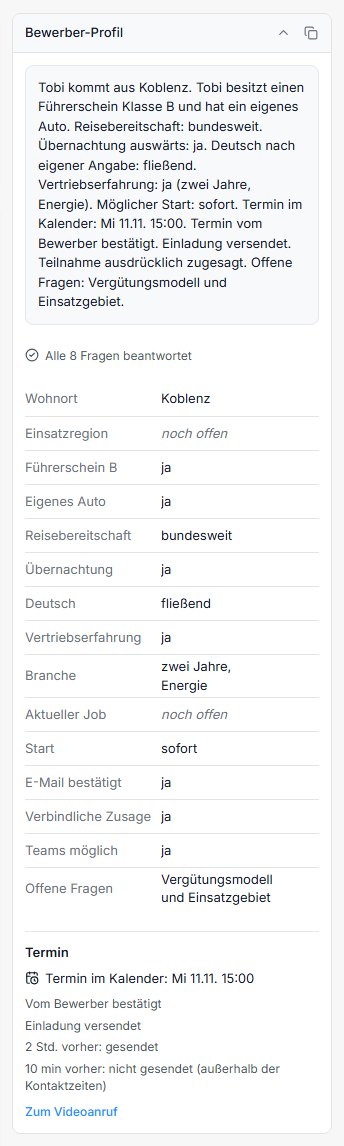
- In the contact, the "Applicant profile" card shows a short summary for your partner manager to copy, all answers and the appointment. Anything missing is shown as "still open". The card only appears for applicants: when a call brought answers or an appointment, or typical applicant answers such as driving licence or car are on the contact.
- If your voice agent cannot catch the email address reliably during the call, it sends the applicant a WhatsApp so they can type it there. It only says the message arrived once it was actually delivered. If the number has no WhatsApp, it asks for the right WhatsApp number. The address from the reply then appears on the contact, even if the applicant only answers after the call.
Good to know
- A finished call appears after a few minutes.
- Costs appear as one item, "Telephony & voice AI", with the total in euros. The total is converted, so it says "approx." in front. If part of the price is still missing, it says "incomplete"; an unknown price is never shown as 0. If the voice AI price of a call is not in yet, it says "not recorded yet".
- Under Metadata, Ended says why the call ended, for example "The contact hung up", "Mia ended the call", "Voicemail detected" or "Time limit reached".
- For calls by your team, the AI summary is not part of this item; it costs you nothing. What the month costs is under Telephony & voice AI in Settings.
- Only owners and admins see costs.
- If a call fits no contact or several, it is shown as "unmatched". Nuntera never guesses. If you create the contact later, the call is still matched.
- You can listen to the recording in the call and in the contact's history with "Listen to recording". Viewers do not hear recordings.
- Instead of a long text there is a short result line at the top, for example "Callback Sat 7 Nov 08:00 · Motivation: mehr Geld", "Not a fit · nur Büro" or "Voicemail · callback requested". The line follows the language you use Nuntera in; what the caller said (place, motivation, reason) stays as it was said. The time is the one that was actually booked. The detailed summary (in German) opens with "In detail".
- If a voicemail picks up, even with a personal greeting, the call shows "Voicemail". It counts as not reached.
- The Nuntera team connects your voice agent for you.
- You change an answer right in the card: hover over the row, click the pencil, pick or type the value, "Save". "Clear" makes it open again once you "Save". A later call does not overwrite a value you changed; it fills an answer you cleared again.
- If the applicant has an appointment in Nuntera WhatsApp, the Applicant profile shows it with reminders and attendance; an appointment booked in the CRM does not appear here. If the call entered an appointment and none is upcoming, the card shows the one booked last; if that came from the call, it says "Appointment according to the call".
- The place of residence from the WhatsApp chat only fills the location on the contact while it is empty. A move mentioned in the chat stays visible on the lead.
- Nuntera does not take the applicant's age into the Applicant profile.
Frequently asked questions
Why don't I see any costs?
Only owners and admins of a workspace see costs.
Can Nuntera place calls itself?
No. Your voice agent calls as before; Nuntera shows you everything that happens.
Where does the summary in the Applicant profile come from?
Nuntera puts it together from the answers and the appointment. Nothing is made up.
What happens when I delete a contact?
In the trash the call shows no name and no conversation. When the contact is deleted for good, the call is gone too.