

Help CenterDaily work
Confirming requests
Last checked against the product: October 18, 2026
What it's about
When your AI takes down a reservation or an appointment your team has to confirm, a card with the guest's details shows up in the chat. You decide with one click, and the AI writes the guest right away what you decided.
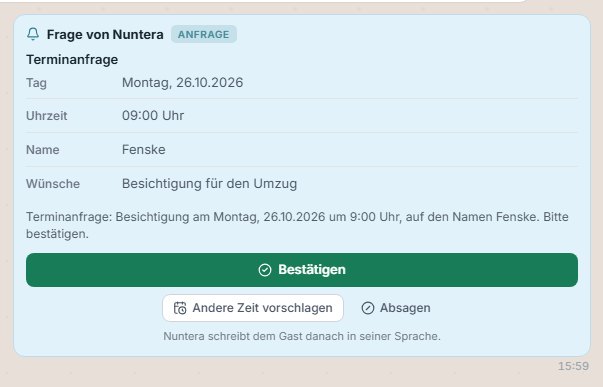
Where to find it
In the lead's chat, as the card "Question from Nuntera" with the badge REQUEST. It shows day, time, party size, name and wishes, as far as the guest gave them.
How it works
- Click Confirm if it fits. If the guest only named a part of the day (the card then shows, for example, "Morning"), Nuntera first asks you for the exact time.
- If the time does not work: Suggest another time, pick day and time, optionally add a note for the guest and click Send suggestion.
- If it does not work at all: Decline, optionally add a reason for the guest and confirm.
- Cancel closes every window without changing anything.
Afterwards the card turns green with the outcome, and a message at the bottom right confirms what happened.
What the AI does
- It hands a reservation or an appointment to your team once all details are there. A time only if the guest named one; if they say "Tuesday morning", it does not invent one.
- After your click it writes the guest the confirmation, the suggestion or the refusal, in their language and with the form of address you use. When declining it does not invent an alternative.
- When the guest accepts a suggestion, it hands it to your team again as a request.
- Nuntera moves the lead to the matching state of your pipeline.
Good to know
- No buttons? Then the AI was missing the day. Simply reply in the chat.
- One action per request. If the card was already handled, for example in another tab, Nuntera tells you and the buttons disappear.
- 24-hour window closed: your reactivation template goes out first, the message follows once the guest replies. If there is no template, Nuntera tells you beforehand and nothing changes.
- No more email: when you decide on the card, no email comes for this request (Escalation by email).
- For opted-out leads, during a campaign and with an open payment the AI does not write; write yourself then.
Frequently asked questions
Can I undo a decision?
Not on the card. Set the state back in the lead panel and write to the guest in the chat.
Can Gary confirm for me?
No. Gary tells you where the buttons are; you decide yourself.
Does this work from Claude or ChatGPT too?
Yes, through your connection you can see open requests and decide them.