

Help CenterMore topics
Instagram DMs
What it's about
Connect your Instagram business or creator account, and DMs to that account land as leads in the same pipeline as your WhatsApp leads.
Where to find it
To connect: Settings → Discover integrations → tile Instagram → "Add". After that Instagram shows under Connected integrations (card Instagram, next to WhatsApp); you manage it there.
How it works
- In Discover integrations, tap "Add" on Instagram. A dialog walks you through three steps.
- "Get started", then "Connect with Instagram" (owners and admins only).
- In the window, log in with your business or creator account and approve.
- Back in the dialog, confirm with "Connect". Done: "View under Connected" opens the card.
- If the card says "Limited": "Try again".
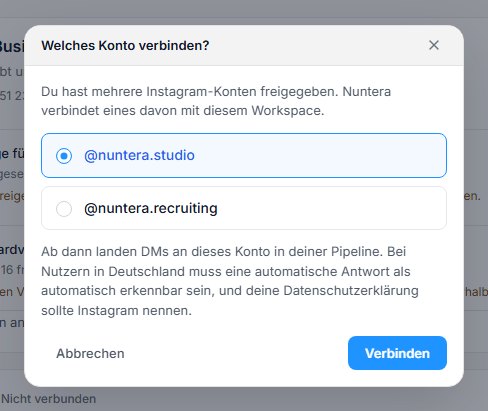
Logging in through Facebook: If the dialog says "Facebook opens a window", you log in there. You pick your business portfolio and your Instagram account and allow access to messages if asked. If you shared several accounts, the dialog asks "Which account to connect?".
Good to know
- Logging in through Facebook needs a business portfolio: Your Instagram account has to be in your business portfolio. If it is missing, add it in Meta Business Suite under Accounts → Instagram accounts → Add, then connect again.
- Already connected? Use the card's menu → "Reconnect" to switch your account to logging in through Facebook.
- Back to the previous login: After that you can switch back for up to 14 days with "Back to previous login" in the card's note. If you reconnect again during that time, the way back is gone.

- One account per workspace: Even if you share several Instagram accounts, Nuntera connects exactly one.
- Not available yet: While Instagram is not switched on yet, the tile in "Discover integrations" shows "Not available yet", and there is nothing to connect.
- Replying on Instagram: you reply right in the chat in Nuntera, and the AI replies too once it is switched on for Instagram. While it is off, it writes nothing there, not even a follow-up; you reply yourself.
- 24 hours: Instagram only allows replies up to 24 hours after the lead last wrote. So ask for an appointment or their number early.
- Follow-ups: If an Instagram lead goes quiet, the AI follows up as long as Instagram allows replies. Once the window is closed, the follow-up ends there; Instagram has no templates.
- Only people who wrote to you first can be messaged. That is how Instagram works.
- Privacy: For users in Germany an automated reply must be recognisable as automated, and your privacy policy should mention Instagram.
- How to spot an Instagram lead: Their card shows the Instagram mark. Hover over it to see the Instagram name, click to copy it. Under Contacts, the Instagram tab shows only Instagram contacts.
- Replying: When less than 6 hours are left, the message field says how long. When the window is closed, you see a yellow note, and you can reply again as soon as the lead writes. Voice messages do not work on Instagram yet.
- Replying as a person after 24 hours: Once Meta has approved this for Nuntera, a person on your team can still reply up to 7 days after the lead last wrote. The message field then says until when. The AI does not reply during that time.
- Photos, videos, voice messages and files from DMs show up in the chat.
- DMs that were left waiting (for example from before Instagram was switched on for you) are picked up by Nuntera for up to 7 days. The AI does not reply on its own to messages older than a day, so nobody gets an answer to a question from days ago.
- If you reply yourself in the Instagram app, your reply shows up in the chat and the AI holds back in that chat until you turn it back on.
- If someone deletes their message, the chat shows "Deleted by sender".
- The connection renews itself and lets you know in time, also by email, if you need to reconnect.
- If you remove Nuntera in your Instagram settings, Nuntera disconnects, and nothing goes out through your account any more. If you ask Instagram to delete your data, Nuntera also deletes your account's name, username and picture; your leads stay. You can follow the status on a page with a confirmation code.
Frequently asked questions
Can I connect a personal Instagram account? No, Instagram requires a business or creator account. Switch it in the Instagram app settings.
Logging in through Facebook said "No Instagram account was selected". What now? Start connecting again and pick your business or creator account in the "choose account" step.
Facebook says "Instagram Pro account required". What does that mean? Your Instagram account is not in your business portfolio yet. Open Meta Business Suite, go to Accounts → Instagram accounts → Add, log in with your Instagram account there, then connect again in Nuntera.