

Help CenterAutomate
Campaigns
Last checked against the product: October 3, 2026
What it's about
A campaign is a fixed script for WhatsApp. When a lead writes your trigger word, such as the text from your QR code or your ad, they get your messages, voice messages and pictures step by step. At the point you choose, the AI takes over the conversation.
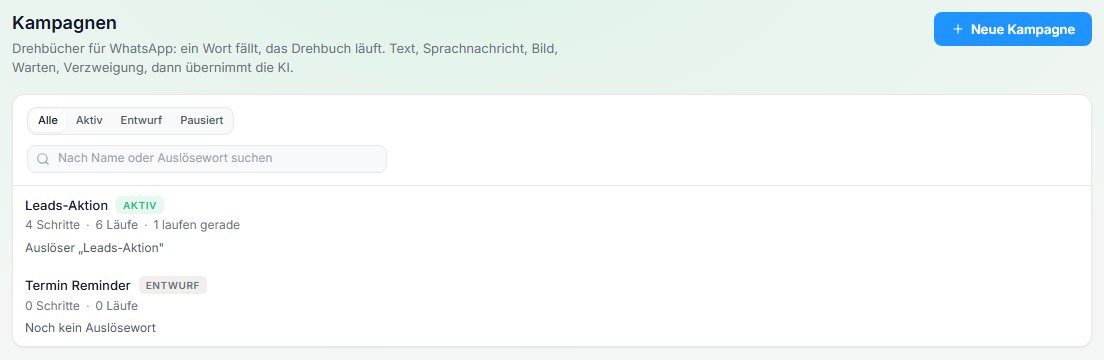
Where to find it
In the sidebar under "Tools", click "Campaigns". At the top right you create one with "New campaign". Above the list you filter by "All", "Active", "Draft" and "Paused", or search by name and trigger word. A click on a row opens the builder, a right click offers "Open", "Pause" or "Activate" and "Archive". On the right of each row you see how many runs are running, done, paused by the lead or failed. Below your campaigns you find ideas for the next one: "Set up" opens the assistant with a suggestion you adjust and send yourself.
How it works
Create one with the assistant
- Click "New campaign".
- Describe in a few sentences, or as a voice message, what the campaign should do: who it's for, what the lead gets and where the AI takes over.
- The assistant builds a draft from that. If a medium is missing, it asks. You record it, pick it from the library or upload it.
- Once everything is there, you send the campaign to your test number via the "Done. The campaign stands." card.
Build it yourself
- Click "New campaign" and then "Build it myself". An empty draft is created.
- In the builder, click the trigger and, in the "Campaign" panel, enter the name and "First message contains".
- Add your steps with "Add step": "Send text", "Send medium", "Wait for a reply", "Wait", "Branch", "Set state" and "Hand over to the AI". With "Move up" and "Move down" you order them.
- A click on a step opens its fields in the panel on the right. Saving happens automatically.
- Click "Check". If something is still missing, it says what and at which step. Then "Activate".
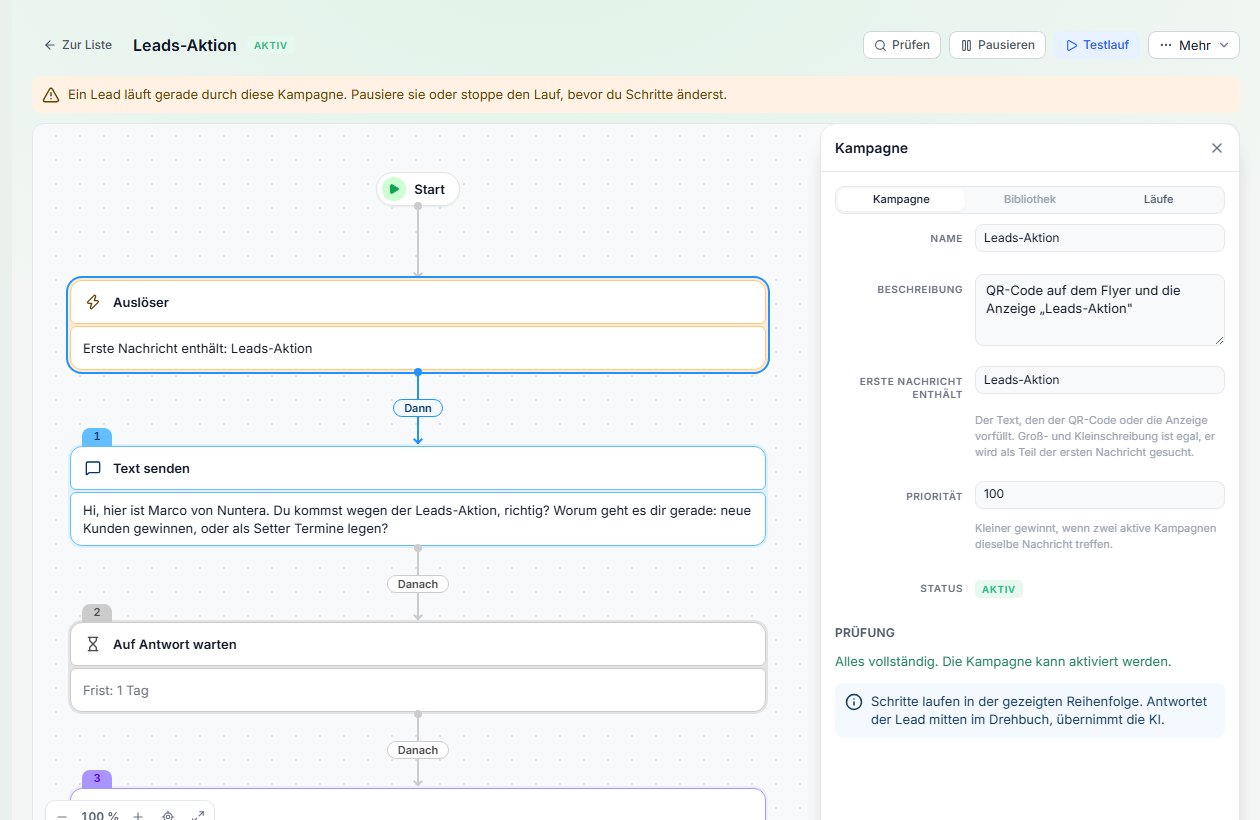
Branching, inserting names, testing
- Branching: Put "Wait for a reply" before it. Give each case "Keywords" or a "Sentence for the classifier" and an "Action". If no case fits, the lead gets what is under "Else".
- Inserting names:
{{VORNAME}}and{{NAME}}are replaced with the lead's name when sending. If Nuntera doesn't know a name, the placeholder simply drops out. - Test run: "Test run", choose a lead, "Start the script". The lead really gets the messages. You store your test number in the library under "Agent details", "My test number" (Agent settings).
- Viewing runs: In the panel under "Runs" you see the latest runs with status and step, jump into the conversation with "Open the chat" and end a running one with "Stop run".
What the AI does
- At "Hand over to the AI" it takes over the conversation, with your instruction if you want.
- If the lead asks something during "Wait for a reply", it answers the question, and the script continues.
- If the lead writes while the script isn't waiting for them, it takes over right away. The rest of the script then no longer comes.
- If a case in a branch has a sentence instead of keywords, it also recognises matching answers in other words.
- The assistant builds the campaign from your description. Activating it stays your decision.
Good to know
- On a US public holiday, a campaign waits for US leads until the next day. If the lead is replying right now, it carries on.
- Choose the trigger carefully. Nuntera looks for it in every message from a lead who hasn't had the campaign yet, not just in the first one. Use the whole sentence that your QR code or your ad prefills, not a single common word.
- Each lead starts a campaign only once via the trigger word. A test run can be repeated.
- WhatsApp window: If the lead hasn't written for more than 24 hours, the next step waits. If an approved reactivation template without a picture is set, the campaign sends it once to reopen the conversation. If the lead replies, it continues. At most one template goes out per silence, whether from you, your AI or a campaign. Without one, the step waits until the lead writes again (WhatsApp connection and templates).
- No sending to a list. A campaign starts through the trigger word or as a test run for one lead.
- You can only change steps while nobody is going through them. Otherwise you stop the run under "Runs".
- Archiving is final. The campaign disappears from the list and can't be brought back.
- Owners and administrators can make changes. Everyone else sees campaigns and runs but changes nothing.
Frequently asked questions
I wrote the trigger word, and nothing happens.
Check whether the campaign is "Active", whether the lead has had it before (also as a test run) and whether they are frozen, opted out or currently in another campaign.
The test run is running, but nothing arrives on the phone.
Reply to the template if one came, or write once from your phone to your Nuntera number. After that, the step goes out.
"Start the script" is grey.
In the builder, the test run only works once the campaign is active. You send a draft from the assistant via its done card to your test number.
I can't find my medium in the selection.
The builder only shows media that are "ready" in the library (Media library).